Urdu Keyboard
Use our Urdu Keyboard to type in Urdu quickly and easily from any device. This Online Urdu Keyboard lets you write, edit, copy, and paste Urdu text without installing software. Whether you need a Virtual Urdu Keyboard for study, work, or daily communication, this page offers a simple, reliable, and user-friendly typing experience.
اردو کی بورڈ پرو
آن لائنIntroduction
An Urdu Keyboard helps you write in Urdu quickly and accurately on any device. You can use this Online Urdu Keyboard directly in your browser without installing extra software. It offers a simple typing tool for students, professionals, businesses, and anyone who wants to communicate in the Urdu language. This page supports Urdu Typing, Urdu Typing Online, and English to Urdu Keyboard input with a clean and easy experience. You can create Urdu text, edit it, and copy and paste it wherever you need.
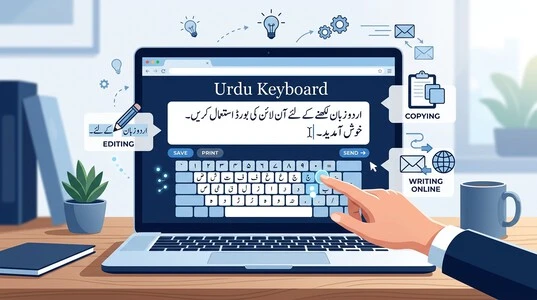
The keyboard uses Unicode, which keeps your text readable across modern websites, apps, and devices. Every key follows a reliable input method that converts your typing into proper Urdu characters. Unicode character encoding helps preserve the correct Urdu script across different platforms. Whether you write messages, emails, documents, or social media posts, this virtual keyboard makes Urdu writing simple and accessible.
What is an Urdu Keyboard?
An Urdu Keyboard is a typing tool that helps you write in the Urdu language using digital devices. It lets you create clear and readable Urdu text for personal, educational, and professional use. Whether you use a computer, tablet, or phone, the keyboard makes Urdu writing simple and convenient. A modern Urdu Language Keyboard works through a digital input method that converts your keystrokes into proper Urdu characters. Most online keyboards rely on Unicode, a global standard that displays text correctly across websites, apps, and operating systems. The Unicode Consortium maintains this standard to support consistent text across different platforms.
Many people choose a Virtual Urdu Keyboard because it works directly in a web browser. You can type in Urdu, review your content, and use it wherever you need. This approach saves time and makes Urdu typing available from almost any internet-connected device. An Urdu Typing Keyboard supports everyday tasks such as writing messages, preparing documents, taking notes, and creating online content. It helps users enter Urdu letters accurately while keeping the typing process simple. The keyboard follows a defined keyboard layout, but this page only introduces the concept. A dedicated guide explains layouts in detail. Modern Urdu keyboards also use character encoding to preserve the correct appearance of every letter.
This process helps your content remain consistent when you share it across different platforms. As a result, your Urdu alphabet and text stay readable for other users without extra formatting.
Online Urdu Keyboard Tool
An Online Urdu Keyboard gives you a fast and simple way to write Urdu without installing software. Open the tool in your web browser and start typing immediately. It works on most modern devices and supports everyday writing tasks. Our Urdu Keyboard Online provides a clean typing space for quick and accurate text input. Each key produces readable Urdu text that you can review before sharing. The simple design helps beginners and experienced users type with confidence.
The keyboard includes useful options that make writing easier. You can copy your text with one click and paste it into emails, documents, messaging apps, or social media posts. If you want to start again, use the clear option to empty the text area instantly. Many people choose Urdu Typing Online because it offers flexibility and convenience. You can access the tool from different computers or mobile devices without changing system settings. This makes it a practical choice for school, work, and personal communication.
A Virtual Keyboard also helps users who need quick access to Urdu while traveling or using a shared device. Since the tool runs inside your browser, you can begin typing whenever you have an internet connection. Most users find this method simple and reliable for daily tasks. You can also use the keyboard with your favorite text editor after copying your content. This allows you to continue writing, editing, or formatting your work wherever you need it. If you frequently use Urdu copy and paste, this workflow saves time and keeps your writing organized.
How Urdu Keyboard Works
An Urdu Keyboard converts your keystrokes into readable Urdu letters as you type. It uses a digital input method to recognize each key and display the correct character on your screen. This process happens instantly, giving you a smooth typing experience. Modern keyboards rely on Unicode, the global standard for displaying text in different languages. The Unicode Consortium develops and maintains the Unicode Standard, which helps computers understand and display multiple writing systems consistently. This standard keeps Urdu readable across websites, applications, and operating systems.
Each Urdu letter has a unique code through character encoding. When you press a key, the keyboard matches your action to the correct Unicode characters. Your device then displays the letter in the proper order to create meaningful words and sentences. Many systems also use UTF-8, one of the most common Unicode encoding formats on the web. UTF-8 stores digital text efficiently while supporting thousands of languages, including Urdu. This makes it a reliable choice for websites, emails, online forms, and digital documents.
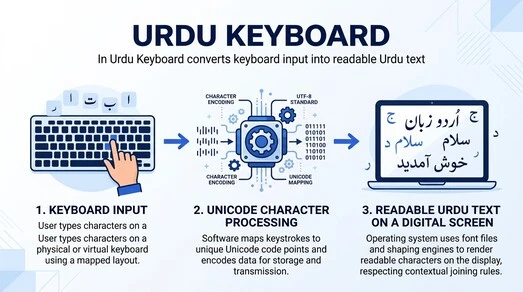
An Urdu Unicode Keyboard follows these international standards to produce consistent results. The same text remains readable when you open it on another device or share it with someone else. This consistency reduces formatting problems and improves compatibility across platforms. Every language input system works behind the scenes to simplify typing. You only press the keys, while the keyboard handles the technical process automatically. As a result, the typing tool feels natural even though several technologies work together in the background.
Once your Urdu text appears on the screen, you can edit, copy, save, or share it with confidence. Because it uses Unicode text, your content stays accurate across supported browsers, devices, and applications. This reliability makes Unicode the foundation of modern digital communication in Urdu.
Key Features
A modern Urdu Keyboard includes several features that make typing easier, faster, and more convenient. These Urdu Keyboard Features improve the writing experience without making the tool difficult to use. Each feature serves a different purpose, while dedicated guides explain them in greater detail. One of the most valuable features is fast typing. A responsive keyboard interface helps users enter Urdu text smoothly with fewer interruptions. This allows students, professionals, and everyday users to write more efficiently. Most Urdu keyboards also support Unicode. This standard keeps your text readable across websites, applications, and devices. It also helps maintain consistent formatting when you share or save your content.
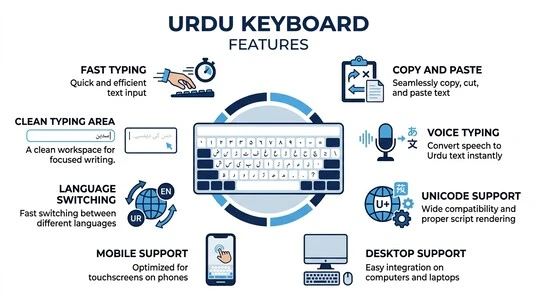
The copy and paste feature saves time during daily tasks. You can copy your completed text and use it in emails, documents, social media posts, messaging apps, or online forms. This simple option makes the keyboard more practical for everyday communication. Many users also look for voice typing support. With voice input, you can create Urdu text by speaking instead of typing. This feature can improve convenience in many situations. A dedicated guide covers voice typing in detail. Modern keyboards often provide mobile support for smartphones and tablets. They also offer desktop support for laptops and computers. This flexibility allows users to access the same typing experience across multiple devices.
Language switching is another useful feature that allows users to move between Urdu and other supported languages without interrupting their workflow. This is especially helpful for people who communicate in multiple languages every day. Some keyboards offer autocorrect to reduce common typing errors, while others provide predictive text to suggest words as you type. These features can improve typing speed and accuracy, although their performance may vary across different keyboard solutions. Other features may include a clean typing area, responsive controls, browser compatibility, simple navigation, and an easy-to-use interface. Together, these features provide a smooth and reliable typing experience for both beginners and experienced users.
Where You Can Use Urdu Keyboard
An Urdu Keyboard fits into many everyday tasks. It helps you with Urdu writing wherever you need clear and accurate communication. Whether you write for personal or professional reasons, you can use it across many digital platforms. Many people use Urdu typing to send emails to friends, family, schools, or workplaces. You can write messages in services like Gmail and communicate in your preferred language without switching devices. The keyboard makes everyday email writing simple and convenient. Social platforms also support Urdu content. You can prepare posts, comments, and updates before sharing them on platforms such as Facebook. Many users prefer writing their text first, then reviewing it before publishing.
Messaging has become another common use. After typing your content, you can share it through apps like WhatsApp and other communication services. This approach helps you write clear messages while reducing typing errors. Students and teachers often use Urdu keyboards for education. They can prepare assignments, notes, presentations, and classroom activities in Urdu. The keyboard also supports learning by making digital writing more accessible. Professionals use Urdu keyboards in business for reports, announcements, customer communication, and internal documents. Clear Urdu text helps organizations communicate with local audiences more effectively.
You can also create documents in applications such as Microsoft Word after completing your typing. Simply copy your text into the document and continue editing or formatting as needed. Most online keyboards work directly in a modern browser, making them easy to access from different devices. This flexibility allows users to write Urdu almost anywhere with an internet connection.
Device Compatibility
A modern Urdu Keyboard works across many devices and operating systems. This flexibility helps users enjoy a consistent typing experience wherever they work. You can switch between devices without changing the way you write. Many people use an Urdu Keyboard for PC to create documents, emails, and online content. Whether you work from home, school, or the office, a computer provides a comfortable environment for longer writing sessions. Both desktop computers and laptops support Urdu typing through compatible tools and browsers.
An Urdu Keyboard for Windows gives users an easy way to write Urdu on one of the world’s most popular operating systems. It works well for everyday communication, document creation, and web-based tasks. A separate guide explains Windows setup and advanced options in detail. Apple users can also access an Urdu Keyboard for Mac. It allows smooth typing for notes, documents, presentations, and online communication. This page introduces Mac compatibility only, while a dedicated article covers the complete setup process.
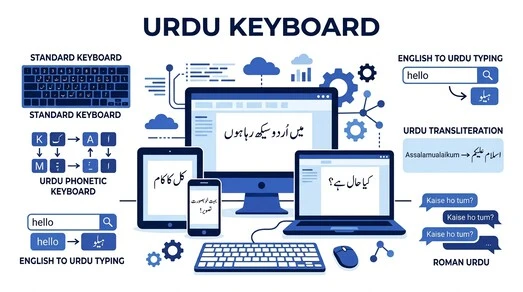
Mobile users often prefer an Urdu Keyboard for Android because it supports quick typing on smartphones and tablets. It helps users stay connected while traveling, studying, or working. The experience remains simple and familiar across many mobile devices. An Urdu Keyboard for iPhone offers a similar experience for users within the Apple ecosystem. It supports everyday typing for messages, emails, and other digital activities. Dedicated guides provide more details about iPhone features and settings.
Most online Urdu keyboards also work directly in a modern browser. This means you can type without depending on a specific device or operating system. Open the tool, start writing, and continue your work with minimal effort. As technology continues to improve, users expect the same typing experience across computers, phones, and tablets. Cross-device compatibility helps make that possible while keeping Urdu writing accessible to everyone.
Different Urdu Input Methods
People use different input methods to type Urdu based on their needs and preferences. Each method offers a unique typing experience while helping users create accurate Urdu text. This page introduces the available options only. Dedicated guides explain each method in detail. A Standard Keyboard is one of the most common ways to write Urdu. It follows a predefined keyboard layout designed for Urdu characters. Many users prefer this method because it provides direct access to the Urdu alphabet. An Urdu Phonetic Keyboard offers another popular option. It is designed for users who feel comfortable typing with English letters while producing Urdu text. This approach has become widely used on computers and mobile devices.
Many users also choose English to Urdu Typing for everyday communication. This method helps people type familiar English letters while generating Urdu words. It provides a simple starting point for users who are still learning Urdu typing. Another common approach is Urdu Transliteration. This method relies on transliteration to convert typed English words into Urdu script. It can make Urdu typing more accessible for users who do not know the traditional keyboard arrangement.
Some keyboards also support Roman Urdu as part of their typing experience. Roman Urdu allows users to write Urdu sounds with English letters before converting them into readable Urdu text. Different tools may handle this process in different ways. Behind every typing method is a keyboard mapping system. It determines how each key produces the correct Urdu character. The mapping process works automatically while you type, creating a smooth writing experience.
Unicode Support
Unicode is essential for modern Urdu typing. It provides a universal standard that helps computers display different languages accurately. Most websites, apps, and operating systems now use the Unicode Standard to support multilingual content. The Unicode Consortium develops and maintains this global standard. An Urdu Unicode keyboard uses this system to create clear and consistent Urdu text. Each Urdu letter has a unique value through character encoding. This enables devices to recognize and display the correct characters without altering their intended appearance.
Many digital platforms also use UTF-8, one of the most widely adopted Unicode encoding formats. UTF-8 supports Urdu alongside thousands of other languages. It also helps keep digital text compatible across browsers, applications, and devices. Unicode support improves consistency when you write, save, or share Urdu content. Your text remains readable whether someone opens it on a computer, smartphone, or tablet. This reduces formatting issues and creates a better experience for both writers and readers. Modern online Urdu keyboards depend on Unicode to deliver reliable results. It helps preserve Unicode characters while maintaining the correct order and appearance of Urdu words. This makes Unicode the foundation of accurate digital Urdu communication.
Urdu Fonts
Urdu Fonts play an important role in how Urdu text appears on digital screens. A good font improves readability and creates a comfortable reading experience. Modern Urdu keyboards work with fonts that support the Urdu script and display characters correctly across different platforms. Two of the most recognized Urdu writing styles are Nastaliq and Naskh. These styles appear in books, websites, newspapers, educational material, and digital content. Each style has its own visual appearance, but both help present Urdu text clearly. This page introduces them only, while dedicated articles explore their differences in detail.
Most modern systems rely on a Unicode Font to display Urdu accurately. Unicode-compatible fonts work with international standards, making them suitable for websites, applications, and digital documents. They also improve compatibility when you share text between different devices. Modern operating systems and web browsers use font rendering technology to display Urdu characters smoothly. Proper rendering helps preserve the shape and connection of letters, making words easier to read. This process works automatically in the background while you type or view content. Good typography also improves the overall reading experience. Clear spacing, balanced letter shapes, and proper text alignment help users read Urdu comfortably on both large and small screens. These elements become especially important for longer articles and documents.
Voice Features
Modern Urdu keyboards often include voice-based tools that make writing faster and more convenient. These features help users create or interact with Urdu text without relying only on manual typing. This page introduces the available options, while dedicated articles explain each feature in detail. Urdu Voice Typing allows you to speak instead of pressing keys. The keyboard listens to your words and converts them into written Urdu. This feature can save time when you need to create messages, notes, or short documents quickly. Another useful feature is Speech to Text. It uses speech recognition to identify spoken words and display them as written text.
Many modern typing tools rely on AI speech recognition to improve accuracy and respond to natural speech patterns.
Some keyboards also support Text to Speech. This feature reads written Urdu aloud, making it easier to review content or listen instead of reading. It can also improve accessibility for different types of users. Voice features depend on a working microphone and clear audio input. Better audio quality often leads to better recognition results. Most modern devices include built-in microphones, making voice tools easy to access. The availability of these features may vary between keyboards, devices, and operating systems. Some tools include advanced voice options, while others focus only on basic typing functions. Choosing the right solution depends on your needs and preferred workflow.
Privacy and Security
Privacy and security are important whenever you type online. A reliable Urdu keyboard should protect your information while offering a smooth typing experience. Understanding a few basic security practices can help you choose a safer and more trustworthy tool. Many online keyboards work directly through your browser. When using additional features, you may receive permission requests. Review these requests carefully and allow only the permissions required for the feature you want to use. A secure website should use HTTPS to protect the connection between your browser and the website. The Internet Engineering Task Force develops standards for secure web communication, while modern browsers use HTTPS to help protect data during transmission.
Good browser security also plays an important role. Keeping your browser updated helps improve security and compatibility with modern web technologies. It also reduces the risk of problems caused by outdated software. Data privacy is another important consideration. Before using any online service, take a moment to read its privacy policy and understand how it handles user information. Trusted websites explain their practices clearly and avoid unnecessary data collection. Some features, such as voice typing, may request browser permission to access your microphone. Grant access only when you plan to use that feature. You can also review or change these permissions later through your browser settings.
Practicing secure typing means using trusted websites, checking for secure connections, and staying aware of the permissions you approve. These simple habits help create a safer online experience.
Tips for Better Urdu Typing
Better Urdu typing develops over time through regular use and consistent practice. Most users improve naturally as they become more comfortable with the keyboard. Small improvements can make everyday typing faster, smoother, and more enjoyable. Urdu Typing Practice helps users build confidence with different typing methods and devices. Regular practice also improves keyboard familiarity, making it easier to recognize keys and write without hesitation. This page introduces the idea only, while our dedicated practice guide covers detailed exercises. Many users also focus on typing accuracy before increasing speed. Accurate typing reduces corrections and creates a better writing experience. As confidence grows, users often notice steady improvements in typing speed during everyday tasks.
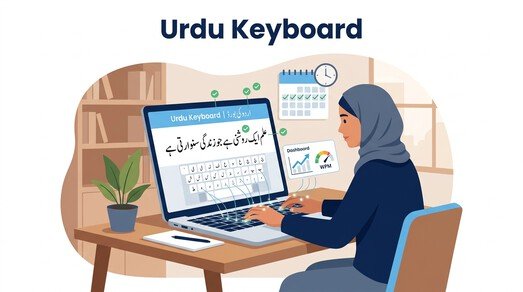
With regular practice, repeated typing gradually develops muscle memory. Your hands start recognizing common key positions without needing constant attention. This natural process makes typing more comfortable, smooth, and consistent. Building good typing habits also supports long-term progress. Short, regular practice sessions often produce better results than occasional, lengthy sessions. For most users, consistency matters more than intensity. Everyone improves at a different pace, depending on factors such as device choice, preferred input method, and previous typing experience. The main goal is steady progress rather than achieving perfection immediately.
Frequently Asked Questions
What is an Urdu Keyboard?
An Urdu Keyboard is a typing tool that helps you write in Urdu on computers, tablets, and mobile devices. It makes digital Urdu writing simple and accessible.
What is an Online Urdu Keyboard?
An Online Urdu Keyboard works in your web browser. You can start typing immediately without installing additional software.
Can I type Urdu with English letters?
Yes. Many tools support English to Urdu Typing, allowing you to type familiar English letters that convert into Urdu text.
What is Urdu Typing?
Urdu Typing is the process of entering Urdu characters digitally. You can type for messages, documents, education, business, and everyday communication.
What is an Urdu Unicode keyboard?
An Urdu Unicode or Unicode Keyboard uses international Unicode standards to display Urdu correctly across supported devices and platforms.
Do I need to install software?
Not always. Many virtual keyboards work directly in your browser. Some users may also choose software or apps for offline access.
Can I use an Urdu Keyboard on Windows?
Yes. An Urdu Keyboard for Windows supports writing in Urdu for documents, emails, web browsing, and many other everyday tasks.
Can I use an Urdu Keyboard on Android?
Yes. An Urdu Keyboard for Android allows you to type Urdu on smartphones and tablets using compatible keyboard apps or online tools.
Does an Urdu Keyboard work on iPhone?
Yes. An Urdu Keyboard for iPhone lets Apple users write Urdu for messages, notes, emails, and other digital activities.
What is a Virtual Urdu Keyboard?
A Virtual Urdu Keyboard displays an on-screen keyboard inside your browser or application. You can type without using a physical Urdu keyboard.
Can I copy and paste my Urdu text?
Yes. Most typing tools support Urdu Copy and Paste. You can move your content into emails, documents, websites, or messaging apps.
Does the keyboard support different Urdu fonts?
Most modern keyboards work with Urdu Fonts that support Unicode. The appearance may vary depending on your device and application.
Is voice typing available?
Some keyboards include Urdu Voice Typing. This feature converts spoken words into written Urdu when supported by your device.
Can I download an Urdu keyboard?
Yes. Many providers offer an Urdu Keyboard Download for computers and mobile devices. Others provide browser-based typing without installation.
What is an Urdu Language Keyboard?
An Urdu Language Keyboard is designed to help users enter Urdu characters accurately using supported input methods and modern typing standards.
Can I use the keyboard for professional work?
Yes. Many people use it for emails, reports, presentations, business communication, education, and everyday Urdu Writing.
Is my Urdu text compatible with different devices?
Most modern keyboards use Unicode, which helps keep Urdu Text readable across computers, smartphones, tablets, and modern web browsers.
Conclusion
An Urdu Keyboard makes digital communication easy, fast, and accessible for everyone. Whether you need it for study, work, or personal use, a reliable typing tool helps you create accurate Urdu Writing with confidence. An Online Urdu Keyboard eliminates the need for additional software, allowing you to type directly from your browser whenever you need it. Start using our Online Urdu Keyboard today and enjoy a smooth Urdu Typing experience. If you want to improve your skills or learn more, explore our related guides on typing practice, Unicode, fonts, keyboard layouts, device-specific keyboards, voice typing, and other useful resources. These resources can help you type Urdu with greater confidence and efficiency.
Popular Urdu Typing Guides
Step-by-step tutorials, free tools, and tips to master Urdu typing on any device.