Urdu Keyboard Layout
Phonetic Layout
Traditional Layout
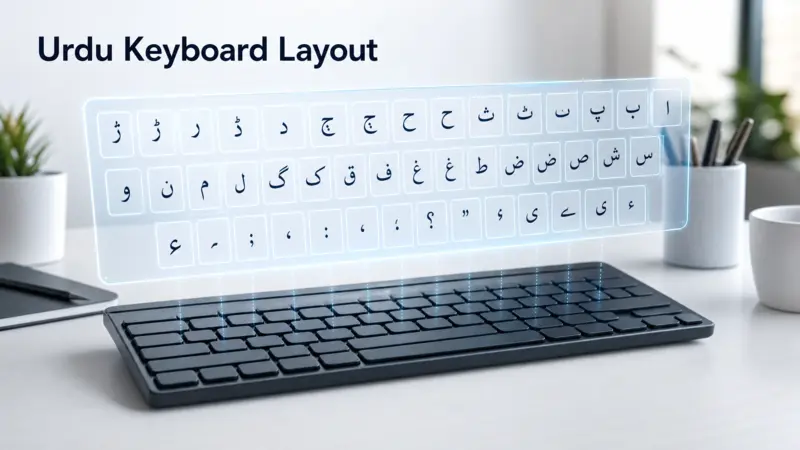
An Urdu Keyboard Layout shows where each Urdu letter, symbol, and punctuation mark appears on a keyboard. It serves as a visual map of the Urdu keyboard and helps users understand Urdu keyboard mapping and Urdu keyboard keys. Knowing the layout makes it easier to identify character positions and compare different standard layouts. This guide focuses on the placement and organization of Urdu characters, not on typing techniques or keyboard lessons.
What Is an Urdu Keyboard Layout?
Definition of a Keyboard Layout
A keyboard layout is the planned arrangement of letters, numbers, symbols, and punctuation on a keyboard. Each key represents a specific character or function. An Urdu Keyboard Layout follows this same idea but assigns Urdu characters to different keys. This organized keyboard mapping creates a consistent system for displaying the Urdu language across compatible keyboards.
How Urdu Characters Are Arranged
Most Urdu keyboard layouts use the familiar QWERTY keyboard as their physical base. However, the printed or assigned characters differ from English. Urdu letters appear in carefully selected positions based on the layout design. Some layouts group related letters together, while others place characters according to common usage or phonetic similarity.
Why Keyboard Layouts Exist
A keyboard layout creates a standard way to organize Urdu characters. It helps users recognize where each letter belongs without confusion. Standardized layouts also support consistency across documents, software, and devices. Organizations such as the Center for Research in Urdu Language Processing (CRULP) and Microsoft have developed widely recognized layouts for this purpose.
Overall Structure of an Urdu Keyboard Layout
Understanding the overall structure helps you read an Urdu keyboard with confidence. Most layouts follow the same physical keyboard design but assign Urdu characters differently. This organization makes the layout predictable and easy to understand. An Urdu keyboard layout chart, Urdu keyboard image, or keyboard diagram can help you visualize these character positions.
Base QWERTY Foundation
Most Urdu keyboard layouts use the standard QWERTY keyboard as their physical base. The key positions stay the same as those on an English keyboard, while only the assigned characters change. This familiar structure allows the same keyboard hardware to support multiple languages. It also provides a consistent reference for displaying Urdu letters across standard layouts.
Urdu Letter Distribution
Urdu letters appear across the keyboard in an organized pattern. Common letters often occupy easy-to-reach keys, while less frequent characters appear in other areas. Many layouts also place related letters near each other to improve consistency. This structured keyboard mapping helps users identify character locations by following a logical arrangement instead of a random order.
Number Row and Special Character Area
The top row contains numbers along with additional Urdu symbols or punctuation in many layouts. The exact character placement depends on the layout design. These positions remain consistent within the same layout, making the keyboard easier to read and reference.
Modifier Keys Used in Layouts
Modifier keys, such as Shift, expand the available character set without changing the keyboard’s physical design. Pressing Shift displays the alternate character assigned to a key. This approach allows one key to represent multiple Urdu characters or symbols while keeping the overall layout compact and well organized.
Urdu Keyboard Character Placement Explained
The placement of Urdu characters follows a structured design rather than a random pattern. Every key has a specific role within the layout. Understanding where different characters appear makes it easier to read an Urdu keyboard layout chart and compare standard layouts. While layouts may differ slightly, they all use clear character mapping to organize the Urdu alphabet.
Placement of Frequently Used Letters
The most common Urdu letters usually appear on the main letter keys in the center of the keyboard. These keys form the primary typing area on a standard QWERTY keyboard. Designers place frequently used characters where they are easy to locate on a layout chart.
Several common consonants, such as ا, ب, پ, ت, ر, س, ک, ل, م, and ن, appear in this central area in many standard layouts. Their exact positions vary between layout designs, but they remain easy to identify because each layout follows a fixed arrangement. Once you understand the pattern, reading the layout becomes much simpler.
Placement of Less Common Letters
Less common Urdu characters often appear on keys around the outer edges of the main letter section. These include letters used less frequently in everyday writing or characters borrowed from Arabic and Persian.
Examples include ث, ذ, ض, ظ, ط, ص, and ق. Standard layouts assign each letter a permanent location. This consistent keyboard mapping helps users recognize every character without searching the entire keyboard.
Position of Aspirated Letters
Urdu includes several aspirated letters, such as بھ, پھ, تھ, ٹھ, جھ, چھ, دھ, ڈھ, کھ, گھ, and لہ. Most keyboard layouts do not dedicate separate keys to these combinations. Instead, they place the individual base letters in fixed positions. The aspirated form comes from combining the base letter with ھ, which also has its own assigned key.
Position of Vowels and Supporting Characters
The Urdu alphabet contains both independent vowels and supporting vowel marks. Independent vowels, including ا, و, and ی, occupy fixed positions within the main keyboard area. Supporting characters, such as زبر, زیر, and پیش, appear on dedicated keys or alternate key positions, depending on the layout. Every standard layout keeps these characters in consistent locations to maintain an organized structure.
Placement of Punctuation Marks
Urdu keyboards also include punctuation marks alongside letters. Common marks, such as the Urdu full stop ۔ and the Arabic comma ،, have designated positions within the layout. Other punctuation symbols, including quotation marks, brackets, question marks, and colons, also occupy fixed keyboard keys. Some appear on the main layer, while others use alternate character positions. A keyboard layout chart clearly shows where each punctuation mark belongs, making the complete layout easier to understand at a glance.
Understanding the Logic Behind the Urdu Keyboard Layout
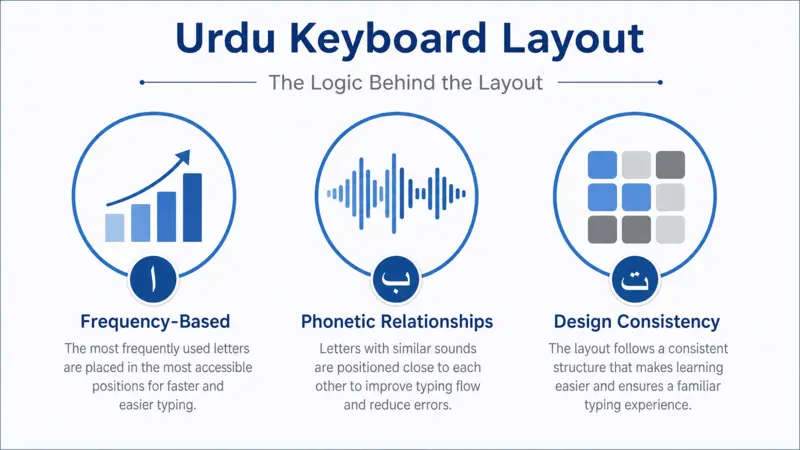
An Urdu keyboard layout follows a planned design instead of placing characters randomly. Every key serves a specific purpose within the layout. Designers consider language structure, character usage, and keyboard organization when assigning letters to keys. This logical arrangement makes the layout clear, consistent, and easy to interpret.
Frequency-Based Character Placement
Many standard layouts place frequently used Urdu letters on the main keyboard area. These letters appear more often in everyday words and sentences. Less common characters are usually placed in other sections. This balanced arrangement creates a practical layout while keeping each character in a fixed position. Keyboard design often considers character frequency when developing efficient layouts for a language.
Phonetic Relationships
Some Urdu keyboard layouts group letters with similar sounds close to one another. For example, related consonants may be placed on neighboring keys. This approach creates a logical connection between characters rather than spreading them across different keys. Phonetic grouping is most common in layouts designed around sound-based organization.
Ease of Access Across the Keyboard
A well-designed layout distributes characters across the keyboard in an organized way. It avoids placing too many important letters in one small area. Instead, it spreads characters across different rows and columns. This balanced structure keeps the layout readable and helps users understand where different letters belong on the keyboard.
Design Consistency
Every standard layout follows a fixed character arrangement. Once a character receives a position, it remains there throughout the layout. This consistency allows keyboard charts, diagrams, and reference materials to display the same key positions every time. Organizations such as CRULP and Microsoft also maintain structured layouts to support reliable and consistent character placement.
Standard Urdu Keyboard Layouts Overview
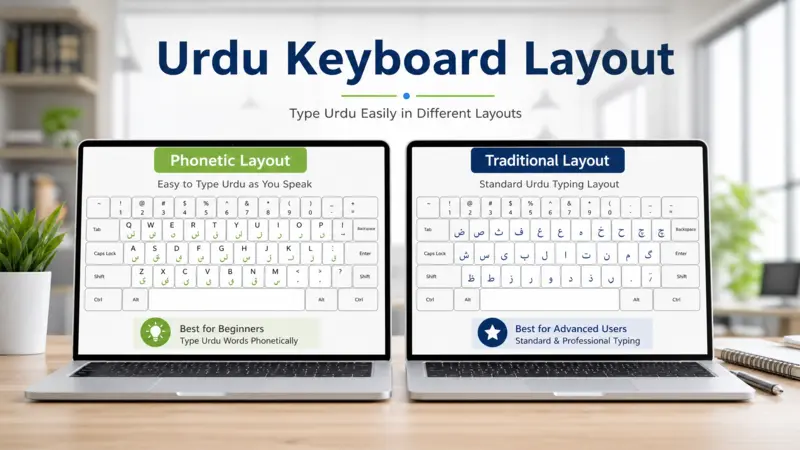
Several standard Urdu keyboard layouts exist today. Each layout organizes Urdu characters in a different way while using the same physical keyboard. Some layouts follow traditional publishing practices, while others focus on phonetic character placement. Understanding these layouts helps you compare their structure and identify the one shown in a keyboard chart or diagram.
Traditional Urdu Layout
The traditional Urdu layout reflects arrangements used in early Urdu publishing and desktop publishing software. It places characters according to established conventions rather than English letter sounds. Many experienced users recognize this layout because of its long history in professional Urdu composition. Although different versions exist, they share the same goal of presenting Urdu characters in a structured and consistent order.
Phonetic Urdu Layout
A Phonetic Keyboard places many Urdu letters on keys that match similar English sounds. For example, an Urdu letter may appear on the same key as its closest English pronunciation. This design creates a familiar character arrangement for users who already know the English QWERTY keyboard. Different developers have produced phonetic layouts, but they all follow the same general idea of sound-based key placement.
CRULP Layout Overview
CRULP (Center for Research in Urdu Language Processing) developed one of the most widely recognized Urdu phonetic keyboard layouts in Pakistan. The organization designed the layout to provide a consistent and standardized arrangement of Urdu characters. Government institutions, educational organizations, and software projects have referenced or adopted the CRULP layout because of its structured design. It remains an important reference for Urdu keyboard mapping and layout standardization.
Microsoft Urdu Layout Overview
The Microsoft Urdu Keyboard is the official Urdu keyboard layout provided with Microsoft Windows. It follows Microsoft’s own keyboard standards while supporting the Urdu language through a fixed character arrangement. Although it shares similarities with other layouts, its key assignments differ in several places from the CRULP phonetic layout. Users often compare these two layouts because both are widely available and commonly used. Microsoft continues to include its Urdu keyboard as part of Windows language support, making it one of the most recognized standard Urdu layouts.
Visual Reference of the Urdu Keyboard Layout
A visual reference makes it easier to understand the overall keyboard structure. An Urdu keyboard layout PDF, Urdu keyboard layout image, or keyboard layout chart shows where each character appears. These references help you identify letter positions without examining every key individually. They also make it simple to compare different standard layouts side by side.
Reading a Keyboard Layout Diagram
A keyboard layout diagram follows the same shape as a standard keyboard. Each key displays the character assigned to that position. Some keys show one character, while others display an alternate character in a separate location on the key. Reading the chart row by row helps you understand how the layout is organized and how characters are distributed across the keyboard.
Understanding Character Labels
Character labels identify the Urdu letter, symbol, or punctuation assigned to each key. The label represents the output for that key within the selected layout. Some keys include an additional label for an alternate character. Always read the chart according to its legend or notation. This approach ensures you interpret every key correctly and avoid confusing one layout with another.
Common Questions About Urdu Keyboard Layout
Is every Urdu keyboard layout the same?
No. Urdu keyboard layouts share the same physical keyboard but differ in character placement. Traditional, phonetic, CRULP, and Microsoft layouts assign some letters to different keys. However, each layout follows its own fixed arrangement. Once you learn a specific layout chart, the character positions remain consistent within that layout.
Why are some letters in different positions?
Different organizations and developers designed Urdu keyboard layouts for different purposes. Some layouts follow traditional publishing practices, while others use phonetic organization based on English letter sounds. These design choices affect where certain Urdu letters appear. Even with these differences, every standard layout keeps its character positions stable and predictable.
What is the difference between a traditional and phonetic layout?
A traditional layout places Urdu characters according to long-established keyboard conventions used in professional publishing. A phonetic layout arranges many letters on keys that match similar English sounds. Both layouts represent the same Urdu alphabet, but they organize the characters using different design principles.
Which layout is considered the standard?
There is no single worldwide standard for Urdu keyboard layouts. In Pakistan, the CRULP layout serves as a widely recognized phonetic standard and appears in many educational and software environments. The Microsoft Urdu Keyboard is the official layout provided with Microsoft Windows. Both layouts follow consistent character mapping and remain trusted references for displaying Urdu keyboard layouts.
Conclusion
An Urdu Keyboard Layout provides a clear structure for organizing Urdu letters, symbols, and punctuation on a standard keyboard. Understanding its character placement and layout logic makes it easier to read keyboard charts and compare different designs. Whether you review a traditional, phonetic, CRULP, or Microsoft layout, each follows a consistent arrangement. This organized approach ensures every character has a defined place within the keyboard.