Urdu Phonetic Keyboard
⌨️ Urdu Phonetic Keyboard — Quick Reference
Click any Latin key to see the Urdu character it types:
Urdu Phonetic Keyboard lets you type Urdu using familiar English keyboard keys. You type words as they sound, making Urdu writing simple and fast. Students, professionals, bloggers, and everyday users prefer this method because it requires little learning. This guide explains how phonetic typing works, its benefits, its limitations, and who can use it effectively.
Introduction
What Is Urdu Phonetic Keyboard?
An Urdu Phonetic Keyboard helps you write Urdu by using English keyboard keys based on pronunciation. You do not need to learn a completely new typing method. Instead, you type familiar letters, and they produce Urdu text. This approach makes Urdu typing easier for beginners and experienced users alike. It also supports smooth digital communication across many devices.
Why It Is Popular Today
Urdu typing has become part of daily life. Students prepare assignments. Professionals write documents and emails. Bloggers create content. Businesses communicate with customers. Social media users share posts in Urdu every day. A phonetic keyboard saves time and reduces the effort needed to write in Urdu.
What This Guide Covers
This guide explains the basics of Urdu Phonetic Keyboard in simple language. You will learn how phonetic typing works, why many people prefer it, and where it fits best. You will also discover its advantages, limitations, common users, and a brief comparison with the standard Urdu keyboard. Throughout the guide, we rely on widely accepted Unicode standards and established language input practices to provide accurate and trustworthy information.
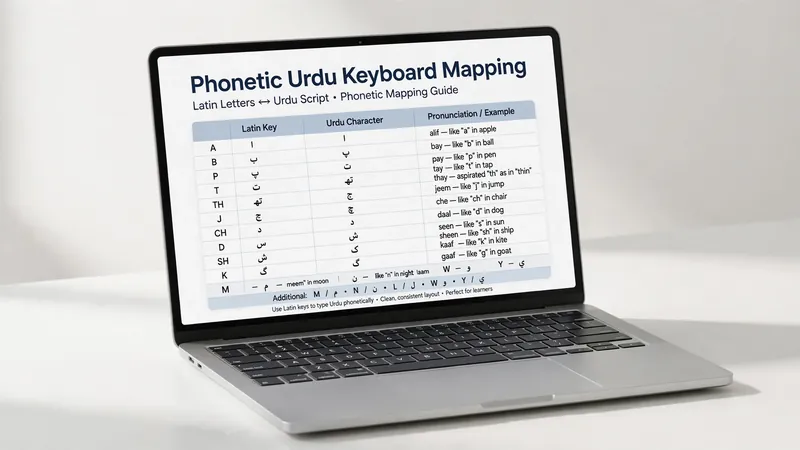
What Is Urdu Phonetic Typing?
Definition of Phonetic Typing
Urdu phonetic typing is a method that lets you write Urdu based on how words sound. You use familiar English keyboard keys instead of learning a separate typing system. The keyboard matches your keystrokes with Urdu characters according to pronunciation. This approach makes Urdu typing easier for new users. It also helps people who already know English keyboard positions start writing Urdu quickly and confidently.
How It Differs from Traditional Urdu Typing
Traditional Urdu typing often requires users to learn a dedicated typing method before they can type efficiently. Urdu phonetic typing takes a simpler approach. It focuses on pronunciation rather than memorization. Most users can start typing immediately because they already know the English keyboard. This convenience makes phonetic typing a popular choice for everyday communication, content creation, and digital writing.
Why It Is Called “Phonetic”
The word phonetic relates to sound and pronunciation. Urdu phonetic typing follows this idea. Users type words according to how they sound in spoken Urdu. The system then produces the corresponding Urdu text. For example, people think about pronunciation instead of searching for unfamiliar keys. This process feels natural because it follows the way many Urdu speakers already read and write Roman Urdu in messages and online conversations.
This pronunciation-based method lowers the learning barrier. It allows users to focus on writing instead of keyboard memorization. As a result, many students, professionals, bloggers, and casual users choose Urdu phonetic typing for daily tasks. Its simplicity remains one of the main reasons behind its widespread adoption.
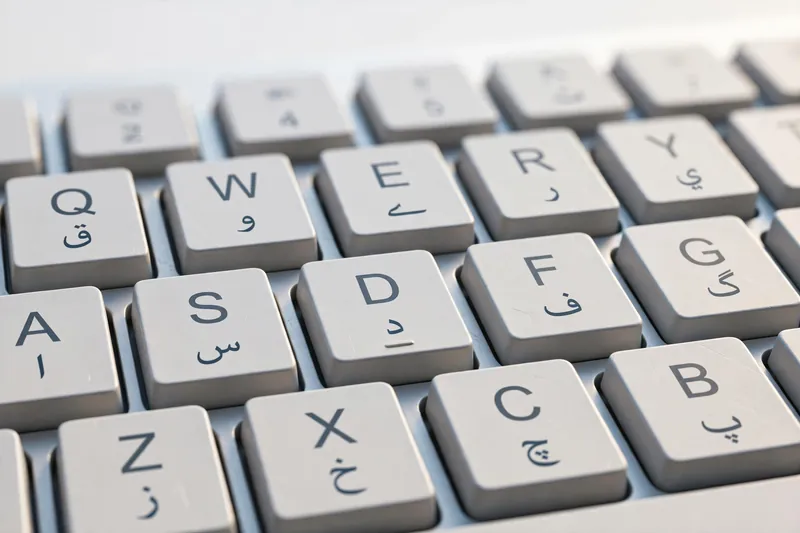
How Urdu Phonetic Keyboard Works
Typing Urdu with English Letters
An Urdu Phonetic Keyboard uses familiar English keyboard keys to create Urdu text. You type words as you pronounce them in Urdu. The keyboard recognizes your input and displays the matching Urdu characters. You can start typing without memorizing a new typing method. This simple approach helps beginners write confidently. It also allows experienced users to type faster because they already know the English keyboard.
Character Recognition Process
As you press each key, the keyboard analyzes your input and identifies the intended Urdu characters. It builds complete words by following common Urdu spelling patterns and language rules. Modern Urdu typing tools also support Unicode, the global standard for displaying text consistently across websites, documents, and devices. The Unicode Standard, maintained by the Unicode Consortium, helps ensure Urdu text appears correctly on compatible platforms and applications.
Everyday Typing Experience
Urdu phonetic typing fits naturally into everyday tasks. Students complete assignments and class notes with ease. Professionals write reports and emails quickly. Bloggers create articles for websites. Businesses communicate with customers in Urdu. Friends and families send messages on social media and chat apps. Because the process feels familiar, users spend less time thinking about typing and more time expressing their ideas clearly.

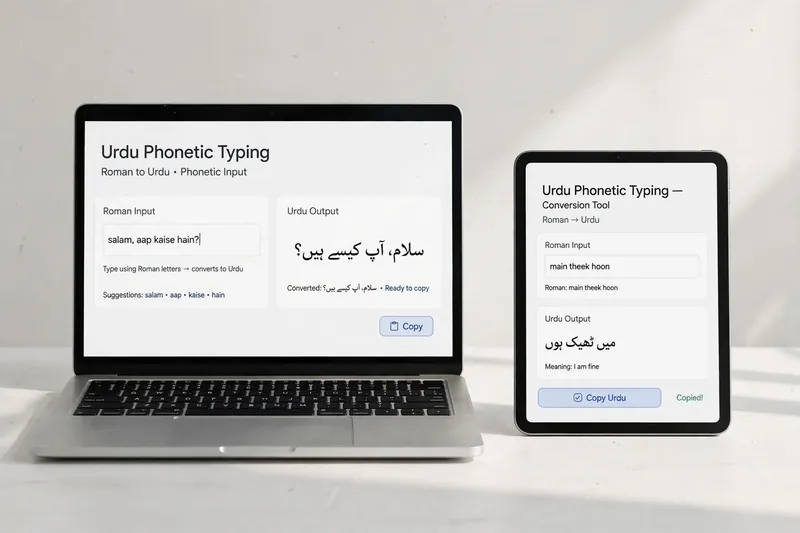
Roman to Urdu Typing Experience
Using Familiar English Keys
One of the biggest strengths of an Urdu Phonetic Keyboard is its familiar typing style. Users type Urdu words with the English keyboard they already know. They simply enter words as they sound in Urdu. The keyboard then displays the correct Urdu text. This approach feels natural for people who often write Roman Urdu in messages or online conversations. It removes the stress of learning an unfamiliar typing system.
Common Typing Scenarios
Urdu phonetic typing supports many daily activities. Friends chat on messaging apps in Urdu. Bloggers write articles and website content. Professionals prepare emails and office documents. Students complete homework, notes, and assignments. Businesses communicate with customers in their preferred language. The same typing method works well for personal, educational, and professional writing, making it useful for almost everyone.
Learning Curve
Most beginners learn Urdu phonetic typing within a short time. They already know the English keyboard, so they focus only on pronunciation. Regular practice improves speed and accuracy. As confidence grows, typing becomes smooth, comfortable, and efficient for everyday Urdu writing.
Advantages of Urdu Phonetic Keyboard
Easy for Beginners
Urdu phonetic typing offers a simple starting point for new users. Most people already understand the English keyboard. They begin typing Urdu without extensive training. This easy learning process encourages more people to write confidently in their native language.
Faster Typing for Most Users
Many users type faster because they rely on familiar key positions. They spend less time searching for keys and more time writing. With regular practice, typing speed improves naturally. This makes daily communication quicker and more comfortable.
No Need to Memorize Complex Key Positions
Users type according to pronunciation instead of memorizing key locations. This approach reduces confusion and helps beginners gain confidence. It also makes Urdu writing more accessible to a wider audience.
Works Across Many Platforms
Modern Unicode support allows Urdu text to display correctly on compatible websites, documents, smartphones, and computers. Users can write once and share their content across different platforms without losing readability.
Improves Productivity
Urdu phonetic typing helps users complete writing tasks more efficiently. Students finish assignments sooner. Professionals prepare Urdu documents with ease. Content creators publish articles faster. Businesses communicate better with customers. Smooth online communication saves time and supports consistent Urdu writing across digital platforms.
Limitations of Urdu Phonetic Keyboard
Pronunciation Differences
People pronounce some Urdu words differently across regions. These variations can affect typing results. Users may need to adjust their spelling to produce the intended Urdu word. A little practice usually solves this issue.
Not Always Ideal for Professional Typists
Professional typists who work with specialized workflows may prefer other typing methods. They often develop speed through extensive practice and established habits. Their choice depends on personal preference and work requirements rather than one method being universally better.
Accuracy May Require Practice
Urdu phonetic typing feels simple, but accuracy improves with regular use. Beginners sometimes make spelling mistakes while learning pronunciation patterns. Reading the text before sharing helps catch small errors. Practice builds confidence, improves consistency, and increases typing speed over time.
Who Commonly Uses Urdu Phonetic Keyboard?
Many people choose an Urdu Phonetic Keyboard because it is easy to learn and practical for daily use.
- Students write assignments, notes, and research with greater ease.
- Bloggers create Urdu articles, reviews, and website content efficiently.
- Journalists prepare news stories and reports under tight deadlines.
- Freelancers communicate with clients and produce Urdu content for different projects.
- Office professionals write emails, letters, reports, and official documents.
- Social media users share posts, comments, and messages in Urdu every day.
- General Urdu writers use it for personal writing, creative work, and online communication.
Its simple learning process and broad compatibility make Urdu phonetic typing a practical choice for anyone who wants to write Urdu quickly and confidently.
Urdu Phonetic Keyboard vs Standard Urdu Keyboard
Both typing methods help users write in Urdu, but they serve different needs. An Urdu Phonetic Keyboard focuses on simplicity and quick learning. A standard Urdu keyboard suits users who already have experience with traditional Urdu typing. Neither option is better for everyone. The right choice depends on your skills, goals, and daily typing habits.
| Topic | Urdu Phonetic Keyboard | Standard Urdu Keyboard |
|---|---|---|
| Ease of Learning | Easy | Moderate |
| Typing Method | Pronunciation-based | Fixed key positions |
| Beginner Friendly | High | Lower |
| Learning Time | Short | Longer |
| Everyday Usage | Very common | More common in professional environments |
If you want a simple way to start typing Urdu, a phonetic keyboard offers an easier learning path. If you already use a standard typing method regularly, you may prefer to continue with it.
Frequently Asked Questions
What is Urdu Phonetic Keyboard?
An Urdu Phonetic Keyboard lets you type Urdu by using familiar English keyboard keys. You enter words according to their pronunciation, and the keyboard displays Urdu text. This method makes Urdu typing simple for beginners and convenient for everyday writing.
How does Urdu Phonetic Keyboard work?
You type Urdu words with English keyboard keys based on how they sound. The keyboard recognizes your input and produces the matching Urdu characters. Modern tools also use Unicode, helping Urdu text display correctly across compatible devices, websites, and documents.
Is Urdu Phonetic Keyboard good for beginners?
Yes. Most beginners learn it quickly because they already know the English keyboard. They focus on pronunciation instead of memorizing a different typing method. Regular practice improves speed, confidence, and accuracy in a short time.
Can I type Urdu quickly using phonetic typing?
Yes. Many users increase their typing speed after a little practice. Familiar key positions reduce hesitation and make writing feel natural. Speed depends on your experience, but most people notice steady improvement with consistent use.
Who should use Urdu Phonetic Keyboard?
Students, bloggers, journalists, freelancers, office professionals, social media users, and general Urdu writers can all benefit from phonetic typing. It works well for anyone who wants an easy and practical way to write Urdu without a long learning process.
Is Urdu Phonetic Keyboard better than a standard Urdu keyboard?
Neither method is universally better. An Urdu Phonetic Keyboard offers a faster learning experience for most beginners. A standard Urdu keyboard may suit experienced users with established typing habits. Choose the option that matches your comfort level and daily writing needs.
Conclusion
An Urdu Phonetic Keyboard makes Urdu typing easier by using familiar English keyboard keys and pronunciation-based input. It helps beginners start quickly while allowing regular users to write comfortably. Its simple learning process, broad Unicode support, and practical everyday use make it a popular choice for students, professionals, bloggers, and content creators. At the same time, it requires some practice to improve accuracy and may not suit every experienced typist. The best typing method depends on your goals, experience, and how you use Urdu in your daily life.
Related Guides
- How to Type in Urdu
- Urdu Typing Lessons: Complete Beginner to Advanced Learning Guide
- Urdu Keyboard Shortcuts
Try our free Urdu Keyboard tool to type Urdu online instantly.