Urdu Typing Online
Urdu Typing Online lets you write Urdu directly in your browser without installing any software. You can type with an Online Urdu Keyboard or use Roman Urdu for faster input. The tool converts your text into Unicode Urdu instantly, making it easy to copy and use anywhere. Whether you are a student, writer, professional, or social media user, browser-based Urdu typing offers a simple way to create clear and readable Urdu text on both mobile and desktop devices.
اردو آن لائن نوٹ پیڈ
What Is Urdu Typing Online?
Urdu Typing Online is a browser-based method that lets you write Urdu without downloading or installing software. You simply open an Urdu Editor, start typing, and receive Unicode Urdu text in real time. This approach works on most modern web browsers and supports quick, convenient Urdu writing. Most online tools offer two input methods. You can type directly with an Online Urdu Keyboard or enter Roman Urdu, where English letters convert into Urdu script automatically. This phonetic input helps users who know Urdu but do not use a traditional Urdu keyboard layout.
These tools generate Unicode text, which follows the global character encoding standard maintained by the Unicode Consortium. Unicode keeps Urdu text readable across websites, documents, emails, and messaging apps. It also helps preserve consistent formatting on different devices. Since everything runs inside your browser, you can access Urdu typing from desktops, laptops, tablets, or smartphones. This flexibility makes Urdu Typing Online a practical choice for anyone who wants fast, accurate, and hassle-free Urdu writing wherever they are.
How Urdu Typing Online Works
Using Urdu Typing Online is simple. Everything happens inside your web browser. You do not need special software or complex settings. Most online tools offer multiple input methods, convert text instantly, and produce Unicode Urdu that works across modern websites and applications.
Browser-Based Urdu Typing
Browser-based Urdu typing runs through a web application instead of installed software. You open the tool in your preferred browser and start writing immediately. The application processes your input in real time and displays Urdu text on the same page. Modern web technologies make this experience fast, responsive, and accessible across desktops, laptops, tablets, and smartphones.
Type Using an Urdu Keyboard
Many tools provide a virtual Online Urdu Keyboard with the standard Urdu keyboard layout. You click or tap the Urdu characters to build words and sentences. This method works well for users who know the Urdu keyboard layout and want direct control over every character they enter.
Type Using Roman Urdu
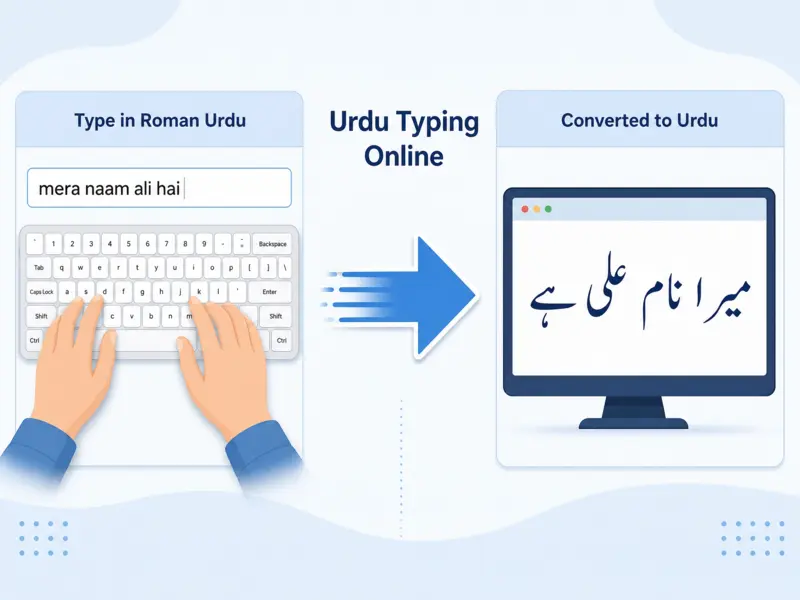
You can also type in Roman Urdu using English letters. The tool uses transliteration and phonetic typing to convert your words into Urdu script instantly.
Example:
mera naam ali hai

↓

میرا نام علی ہے
This method feels natural for many users because they do not need to memorize an Urdu keyboard layout.
Copy or Save Your Text
Once your Urdu text is ready, you can copy and paste it into emails, documents, websites, or social media posts. Many Urdu Editor tools also let you save or download your work for later use. Because the text uses Unicode, it stays readable across most modern platforms and devices.
Benefits of Using Urdu Typing Online
Urdu Typing Online offers a simple way to write Urdu without extra setup. You can access it from almost any modern browser and create Unicode text within seconds. These tools save time, improve convenience, and make Urdu writing easier for students, professionals, content creators, and everyday users.
No Installation Required
You can start typing as soon as the page opens. There is no need to install software or configure your device. This saves storage space and reduces setup time. A browser and an internet connection are all you need to begin writing in Urdu.
Works on Any Device
Most online Urdu typing tools work across different devices. Open them in a Windows or Mac browser, or use them on Android, iPhone, or a tablet. A responsive design adjusts the interface to different screen sizes, making typing comfortable wherever you are.
Easy for Beginners
Many people find Roman Urdu easier than a traditional Urdu keyboard. You type familiar English letters, and the tool converts them into Urdu script. This approach reduces the learning curve and helps new users write Urdu with greater confidence and speed.
Supports Unicode Urdu Text
Most tools generate Unicode Urdu text, the international standard for digital characters maintained by the Unicode Consortium. You can copy your text into websites, emails, documents, messaging apps, and social media without losing readability. Unicode also improves compatibility across different operating systems and browsers.
Accessible Anytime
You can use Urdu Typing Online whenever you have internet access. Simply open the tool in your preferred browser and begin typing. Most platforms use responsive designs that work smoothly on both large and small screens. This flexibility lets you write Urdu at home, at school, in the office, or while traveling.
Common Uses of Urdu Typing Online
Urdu Typing Online serves many personal, educational, and professional needs. Since it works in a browser and produces Unicode text, you can create content once and use it across different digital platforms without formatting issues.
Writing Emails
You can write clear and professional emails in Urdu for colleagues, clients, teachers, or friends. Unicode text keeps your message readable across most email services and devices, making communication simple and reliable.
Creating Social Media Posts
Many users create Urdu posts for platforms like Facebook, Instagram, and X. Browser-based typing makes it easy to prepare captions, updates, quotes, and announcements before sharing them online.
Writing Blog Content
Bloggers and website owners use Urdu Typing Online to create articles, guides, and news updates. Unicode Urdu displays correctly on modern websites, helping readers enjoy a consistent experience across different browsers and devices.
Preparing Office Documents
Professionals can prepare reports, notices, letters, meeting notes, and other business documents in Urdu. After typing, they can copy the text into document editors or workplace applications without losing character formatting.
Personal Communication
You can write messages, greetings, invitations, and family updates in Urdu. This makes daily communication more natural while preserving the beauty and clarity of the Urdu language.
Educational Purposes
Students and teachers can prepare assignments, class notes, study materials, and educational resources in Urdu. Browser-based typing offers a quick way to create readable Unicode text for digital learning and classroom activities.
Features to Look for in an Online Urdu Typing Tool
Choosing the right Online Urdu Typing Tool improves your writing experience. A good tool should offer accurate conversion, smooth performance, and simple controls. These features help users create clear Urdu text without unnecessary steps.
Fast Urdu Typing
A reliable tool should process your input quickly and display Urdu characters without delays. Fast response improves the overall experience, especially when writing longer messages, articles, or documents. Smooth performance helps users focus on their content instead of technical issues.
Accurate Transliteration
Good Roman Urdu support depends on accurate transliteration. The tool should understand common Urdu words and convert English letters into the correct Urdu script. Better conversion reduces manual corrections and makes Urdu writing easier for users who prefer phonetic typing.
Unicode Support
A quality Urdu typing tool should create Unicode text. Unicode ensures that Urdu characters display correctly across websites, emails, documents, and applications. It also improves compatibility between different devices, browsers, and operating systems.
Mobile-Friendly Interface
A responsive design makes typing easier on smartphones and tablets. Buttons, text areas, and menus should adjust properly to smaller screens. A mobile-friendly Urdu Keyboard Online experience allows users to write comfortably from any device.
Copy and Paste Functionality
Easy copy and paste options save time after creating Urdu text. Users should be able to move their content into messages, documents, websites, and other platforms without losing characters or formatting.
Clean User Interface
A simple interface improves usability for everyone. The tool should have clear buttons, readable text areas, and fewer distractions. A clean Urdu Editor helps beginners and experienced users type efficiently while enjoying a better writing experience.
Limitations of Urdu Typing Online
Although Urdu Typing Online offers great convenience, it also has some limitations. Understanding these points helps users choose the right tool and get better results while creating Urdu content.
Requires Internet Access
Most browser-based Urdu typing tools need an active internet connection to work. Without internet access, users may not be able to open the tool or process their text. A stable connection also helps maintain smooth performance.
Depends on Browser Performance
Online tools run inside web browsers, so their performance can vary. Older browsers or limited device resources may affect loading speed, responsiveness, or overall user experience.
Transliteration May Not Always Be Perfect
Roman Urdu conversion uses phonetic rules to create Urdu script. However, some words can have multiple spellings or meanings. The tool may need help from the user to choose the correct Urdu word.
Manual Corrections May Be Needed
Users may need to review and adjust some characters, spellings, or sentence structures. A quick review helps ensure accurate and natural Urdu writing.
Font Differences Can Affect Display
Urdu uses complex script rendering, and different devices may display fonts differently. A suitable Unicode-supported font helps maintain clear and readable Urdu text across platforms.
Tips for Getting Better Results
Using Urdu Typing Online becomes easier when you follow a few simple practices. Small improvements in your input and settings can help you create more accurate and readable Urdu text.
Use Correct Roman Spelling
When using Roman Urdu, type words clearly and use common spellings. Better input helps the tool understand your meaning and generate more accurate Urdu script.
Review Generated Urdu
Always check the converted text before sharing it. A quick review helps you find spelling differences, missing words, or incorrect conversions.
Copy Unicode Text
Use Unicode Urdu text when moving your content between platforms. It keeps your writing readable on websites, emails, documents, and messaging applications.
Choose the Correct Keyboard Layout
If you use an Urdu Keyboard, select a layout that matches your typing preference. The correct layout makes character selection easier and improves your overall experience.
Use Updated Browsers
Modern browsers provide better support for web applications, Unicode characters, and responsive designs. Keeping your browser updated helps ensure smoother Urdu typing performance.
Frequently Asked Questions
What is Urdu Typing Online?
Urdu Typing Online is a browser-based tool that allows users to write Urdu directly on the web. It supports Urdu keyboards, Roman Urdu input, and Unicode text generation. Users can create Urdu content without complex setup and use it across different digital platforms.
Is Urdu Typing Online free?
Many online Urdu typing tools offer free access. Users can open the tool in a browser and start writing Urdu without paying for basic typing features. Availability of advanced features may vary between different platforms.
Can I type Urdu without installing software?
Yes, you can type Urdu directly through a browser-based tool. These platforms work online and do not require additional software installation. You only need a compatible browser and an internet connection to start writing.
Can I use Urdu Typing Online on mobile?
Yes, most Urdu Typing Online tools work on smartphones and tablets. A responsive design adjusts the interface for smaller screens, allowing users to type Urdu through mobile browsers.
Does it support Unicode?
Yes, quality Urdu typing tools generate Unicode text. Unicode helps Urdu characters display correctly across websites, emails, documents, and messaging platforms. The Unicode Consortium maintains the Unicode standard used for digital text representation worldwide.
Can I copy and paste Urdu text anywhere?
Yes, Unicode Urdu text can usually be copied and pasted into supported websites, documents, emails, and applications. This makes sharing and publishing Urdu content easier across different platforms.
Which browser works best?
Modern browsers generally provide the best experience for online Urdu typing. Updated versions of popular browsers offer better support for Unicode characters, web applications, and responsive interfaces. Users should keep their browser updated for smoother performance.
Start Using Urdu Typing Online Easily
Urdu Typing Online makes Urdu writing simple, fast, and accessible for everyone. You can type directly in your browser without installing software or changing complex settings. The tools support Unicode Urdu text, which helps your content display correctly across websites, emails, documents, and messaging platforms. With features like Roman Urdu input, an Online Urdu Keyboard, and easy copy-and-paste options, you can create Urdu content from almost any device. Whether you use a desktop, laptop, tablet, or smartphone, browser-based Urdu typing gives you a convenient writing experience.